
This is a very simple text file to create that will provide really great value.
It is based on the RFC 9116.
When security researchers identify security vulnerabilities in your organization's internet facing infrastructure, you would like to be notified as soon as possible. This file will provide the necessary information to the researchers where they will report the vulnerability. Having this file helps communication of vulnerabilities way much Faster.
Having a Security.txt file is like helping the guardian angels of the internet to officially communicate directly to you without having to go through your organizations internal politics.
Creating a Security.txt File
There are prerequisites that are required before starting.
- FTP Access to your website or access to the file manager of your organization's domain/sub-domain
- An email address where the notifications will be sent
Once you have the prerequisites ready, open the https://securitytxt.org/ website. This is a tool that will help use to to create our security.txt file
Step 1
We will begin by adding the email address you have selected to receive notifications.

Step 2
Next we will input the duration which this security.txt will be valid. This is completely a personal preference, you can choose the period you are comfortable with. The important thing is to make sure that you have a reminder set to update your security.txt file

These first two steps are a must for the Security.txt file to be valid The next steps are optional, however they are highly recommended.
Step 3
Next input a webpage within the domain or subdomain of your organization where you will provide recognition/appreciation/shout out for security researchers, bug bounty hunters and companies that provide you with Security Vulnerability Information.

A sample acknowledgement file is as shown in the screenshot below

Step 4
We will provide the URL Location of the Security.txt file. Some organizations would put this file in a different URL as opposed to the default location.

Step 5
If your organization is part of a bug bounty program or you have a preference on how you would like the Vulnerability notifications to be sent to you, provide a link to the policy/preferences you have for the researchers to read before making the submissions.

Step 6
What we have is enough information to create the Security.txt file. We will scroll down to the page and click on Generate Security.txt file button.
The final result will look like the image below
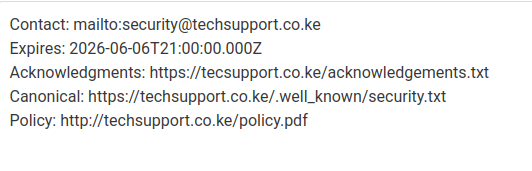
From this we can create and save Security.txt file and the upload it to the URL provided in the Canonical section. The default location is techsupport.co.ke/.well-known/security.txt
To confirm the file you have uploaded is valid and in the correct format, search your domain using the tool Find Security Contacts
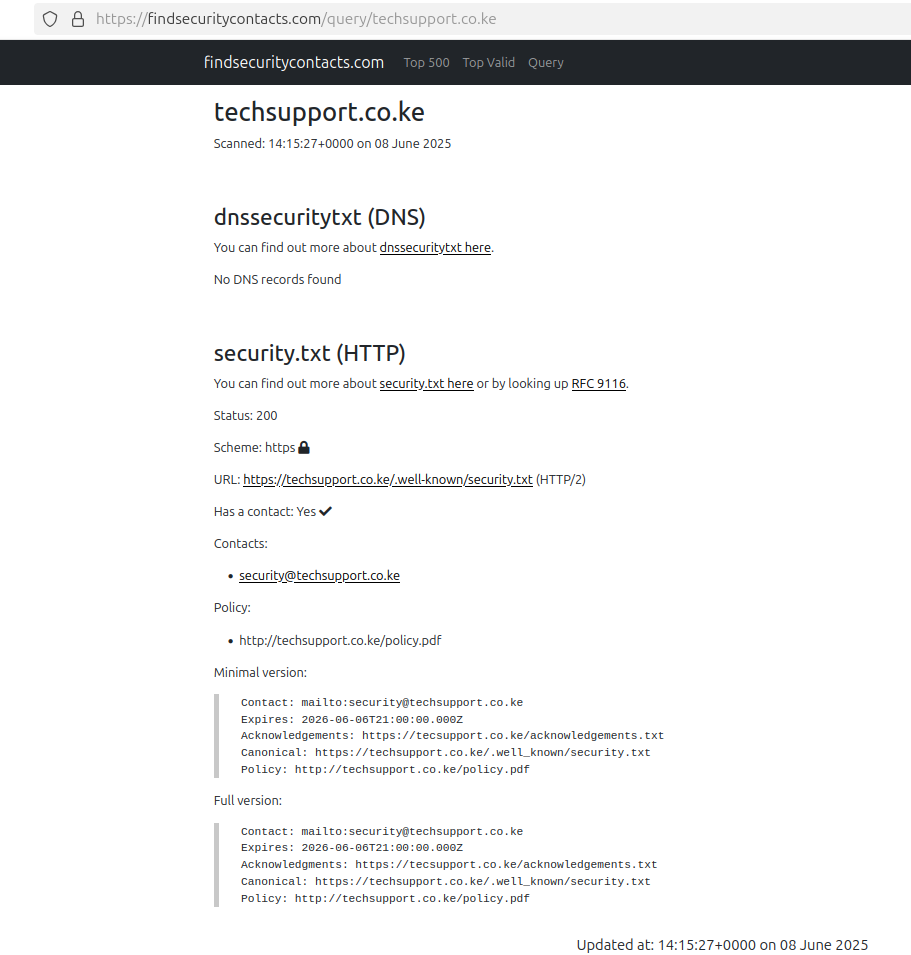
You must have noticed that we did not add the Public Encryption Key. This will be demonstrated in a later tutorial on how to sign the Security.txt file to assure the Vulnerability Researchers
I hope this tutorial has helped you. If it has please add Gatura Kamau to in your Acknowledgement file and share it as well to help another soul.
References
- CISA - A Simple File with Big Value
- KrebsOn Security - Does your Organization Have a Security.txt file
- HackerOne - What Is a Security.txt File and How Can It Help Your Security Program?
- RFC 9116 - A File Format to Aid in Security Vulnerability Disclosure